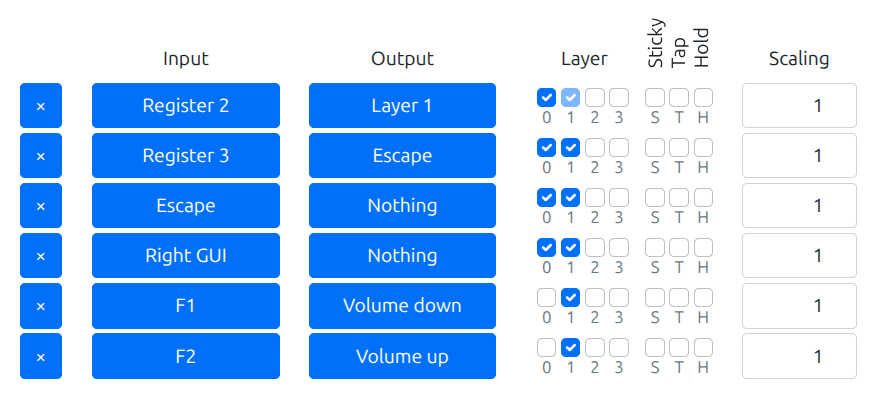
First of all, great firmware, docs, config page, and videos!
I have an old keyboard that lacks both the fn key and the multimedia modes of the F1-F12 keys (mute, volume down, etc). To use a newer Dell keyboard I have as a reference, fn+Escape will toggle the function lock, and pressing fn as a modifier will momentarily invert the state of the function lock while pressed. How can I reproduce this behavior on an old keyboard using, say, the RightGui key in place of the fn key?
I’ve noticed some nuances in the Dell behavior. The fn key serves two uses: Its first use is to turn the Escape key into function lock toggle when you press Escape while fn is held down. However, even though the Escape key is affected by fn in this way, it is not affected by the function lock. The function lock only affects F1-F12! Second, the fn key serves to INVERT the function lock state momentarily. So for example, pressing fn+F1 while locked will output F1 instead of Mute. Pressing fn+F1 while unlocked will output Mute.
I don’t know if it’s possible with just layers and mappings, but you can do it with an expression like this:
/* esc toggles register 1 when right windows key held */
0x00070029 prev_input_state_binary not
0x00070029 input_state_binary mul
0x000700e7 input_state_binary mul
1 recall not
1 recall
ifte
1 store

/* right windows key inverts state when held */
0x000700e7 input_state_binary
1 recall not
1 recall
ifte
2 store

/* esc doesn't send esc when right windows key held */
0x00070029 input_state_binary
0x000700e7 input_state_binary not mul
3 store
Here’s a JSON file with the configuration: hid-remapper-fn.json (3.9 KB)
It also uses the Caps Lock LED to show current state. You can remove that if you don’t need it.
Works great. Thank you for the quick turnaround. The idea of using the caps-lock LED as an fn-lock indicator is glorious. No more playing Russian roulette with the function keys, where I’ve inevitably forgotten whether fn-lock is on or not!
By the way, what’s happening with Expression 2? Is it sending a hard coded 1 to the LED? Should the input not just be “Register 1”? Or is it implicitly doing “1 recall”?
I had made a mostly-working attempt shortly after posting the original question, but using exclusive-or between lock and “fn”, and outputting the expression directly to Layer 1. Yours is obviously better.
/*0x00070029 = Esc, 0x000700e7 = Right GUI substituting for fn key*/
/*check for function-lock sequence (fn+Esc press):*/
0x00070029 prev_input_state_binary not
0x00070029 input_state_binary
bitwise_and
0x000700e7 input_state_binary
bitwise_and
/*toggle lock if fn+Esc:*/
1 recall not
1 recall
ifte /*new_value = fn && escape_edge ? !last_value : last_value*/
1 store

/*media keys when either locked or fn key, but not both (exclusive or):*/
0x000700e7 input_state_binary
1 recall not
mul
0x000700e7 input_state_binary not
1 recall
mul
add
/*Output to layer 1*/
Yeah, you could just make a Register 1->Caps Lock LED or Register 2->Caps Lock LED mapping, depending on what you want to visualize (lock state or momentary state). My version is just a generic diagnostic that shows when the layer is actually active. It would only make a difference if there were other ways of activating the layer.
(Expression 2 is literally just returning a constant “1” and note that the Expression 2->Caps Lock LED mapping is only enabled on Layer 1.)