I’m looking for a way to catch a key combination and replace it. The idea is to catch Win+Shift+S and replace it with PrintScreen. I created something with two layers, which at least caught this and sends the PrintScreen, but it also sends a single S at the same time - which shouldn’t happen. Anyone has an idea?

The S is probably sent when you release the modifier keys before you release S and it goes back to the lower layers.
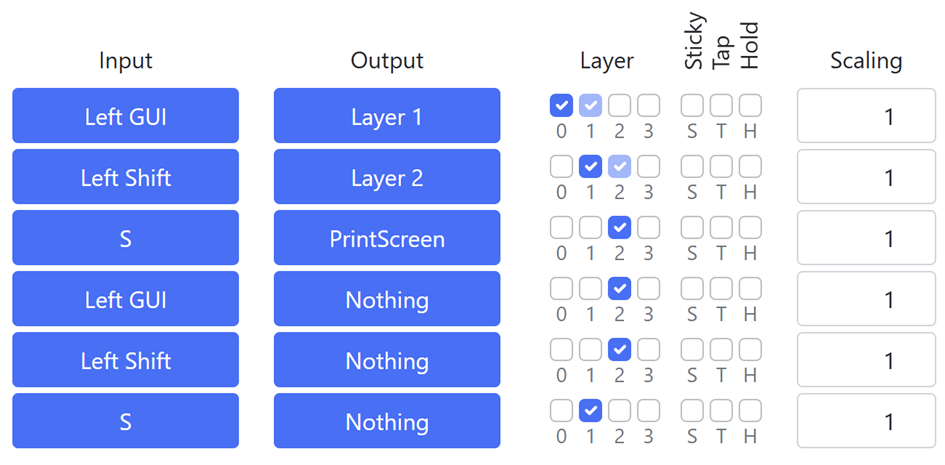
Somehow this seems to be completely wrong. I now experienced that e.g. other key combinations starting with Win-Key (=Left GUI) are blocked.
Does anyone know how to do propper catching of a specific key combinations in general (without blocking other key combinations)? Do I maybe have to use an expression?
Yes, you can easily check if all three buttons are pressed using an expression, put that into a register and map that to whatever you need, but you also have to change how the individual keys work by themselves, so that they’re not sent when all three are pressed, but work normally when only one or two of them are pressed. Here’s a configuration implementing a similar thing:
I would suggest that you don’t use a common modifier key. You can use anything on your keyboard, so pick a key that you never have to hold down for any reason. Then you maintain your Windows key’s functionality.
For example, you could simply make it that tapping the P key sends a letter P, but holding it sends Printscreen. Or make it that holding [ changes to Layer 1 and then tapping ] sends Printscreen. With HID Remapper, you have access to many more options than the standard modifiers.
If you still prefer your original combo, you might want to instead use Microsoft Power Toys, which has a remapping utility that you can use to add custom combos.
Thank you very much! I adapted this example and now seems to work fine (at least so far I didn’t have any trouble).
1 Like
Thank you very much for that advise, but the reason why I need this is the following: I have a private Logitech keyboard with a few customs keys. These keys are sending those key combinations to the computer (so I cannot change them). The computer is a business computer and I cannot install any software on it. So in order to change the standard configuration from Logitech, I need a hardware solution otherwise the custom keys would simply be useless.
But if I could install software, then Power Toys (or Logitech-software) would be of course the preferred way.