As the title suggests, I have a great usb keyboard but it has a “Copilot” key instead of RIGHT CTRL. I was hoping to use HID remapper with a Waveshare RP2350-USB-A board to get the RIGHT CTRL back. I have flashed HID remapper in the board and I can open the device in HID Remapper Configuration , but I’m not sure how to configure it.
I’ve searched the entire site and there is no reference to “copilot”.
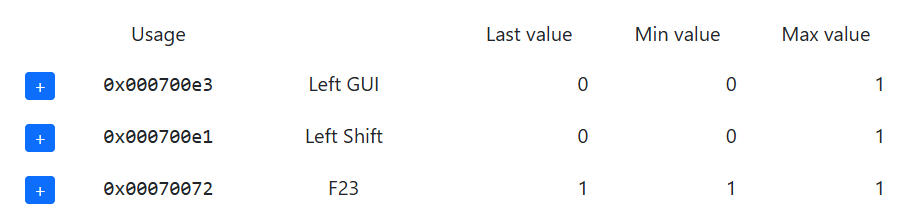
The Copilot key is actually a macro of Left Shift + Windows Key + F23. How do I remap that to the RIGHT CTRL?
Forgot to say that my main goal is to convert the COPILOT key to RIGHT CTRL so I can use the CTRL+HOME/END combinations to go to documents top/bottom like I’ve doing for the past 30 years.
You would probably have to do a couple different things.
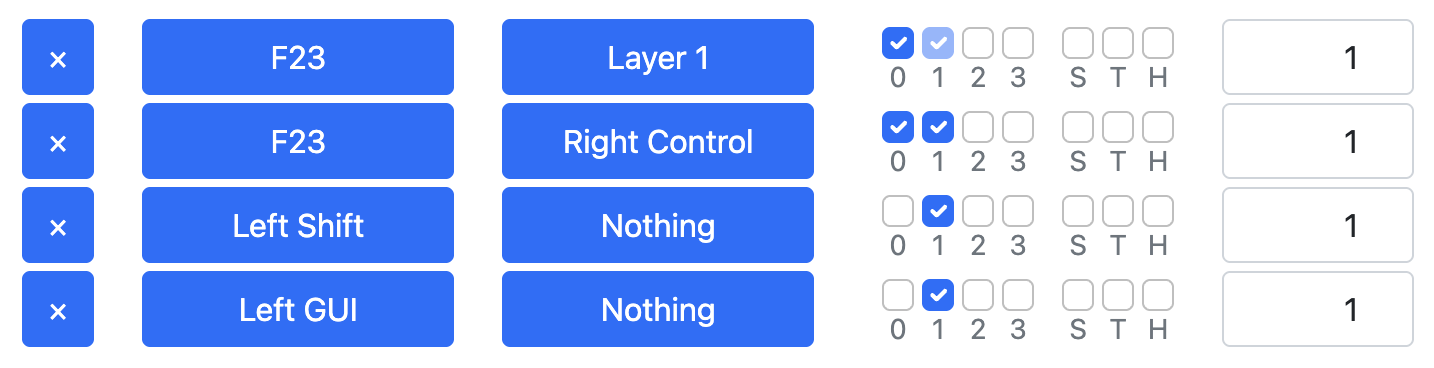
Just map F23 to Right Control (you probably don’t have a real F23 key so you don’t have to worry about only mapping it when Left Shift and the Windows key are pressed).
Make it so that Left Shift and the Windows key are filtered out when F23 is pressed. This could be done with a simple expression, or possibly layers.
However, first check how the Copilot key on your keyboard actually works. I seem to recall reading that it doesn’t hold the combination for as long as you press it, at least on some keyboards. Instead it presses and immediately releases the keys. Perhaps it only behaves like that on some laptops but if your keyboard works like that then you likely won’t be able to map it to Control as we would have no way of knowing when the key is released.
Also even if we manage to map it to Control, you still wouldn’t be able to use it for combinations like Control+Left Shift, because we wouldn’t be able to tell that you’re actually holding the real Left Shift.
Assuming your keyboard actually holds the combination when you hold the key and that it uses the Left Shift and the Left Windows keys, you could try something like this (untested):
(Or a combination of how the monitor works and how the inputs are sent on the wire.)
For “array” inputs it doesn’t show the key release at all, even for normal keys.
On many keyboards all the keys except the modifiers are “array” inputs.
So unfortunately my guess is that your keyboard does suffer from the issue I described. I don’t know why they do it like that, it makes no sense, but then again nothing about the Copilot key makes sense.
No problem. Thank you very much anyway. I guess I’ll give up for now, but I absolutely love this software and I am sure I will use it again in the future.
To all the keyboard manufacturers: please don’t try to reinvent the keyboard!