Hey HID Remapper Community,
Hope you all are doing well. I was wondering if I could get some guideance or assitance on a problem I am having with HID remapper. Specifically, I am having trouble getting it to recognize inputs from a special keypad that I am using. The HID remapper that I am using is the custom v5 board bought through Mavercade ( HID Remapper – Mavercade ) as recommended by another forum post. I have flashed it with the most recent firmware twice to be sure. Now onto the context and issue.
I am a radiologist and I am trying to see if I could use HID remapper to remap the default outputs of a special keyepad to specific macro shortcuts while retaining the existing mouse function. The device that I am trying to get working is called the Hologic SecurView Keypad:
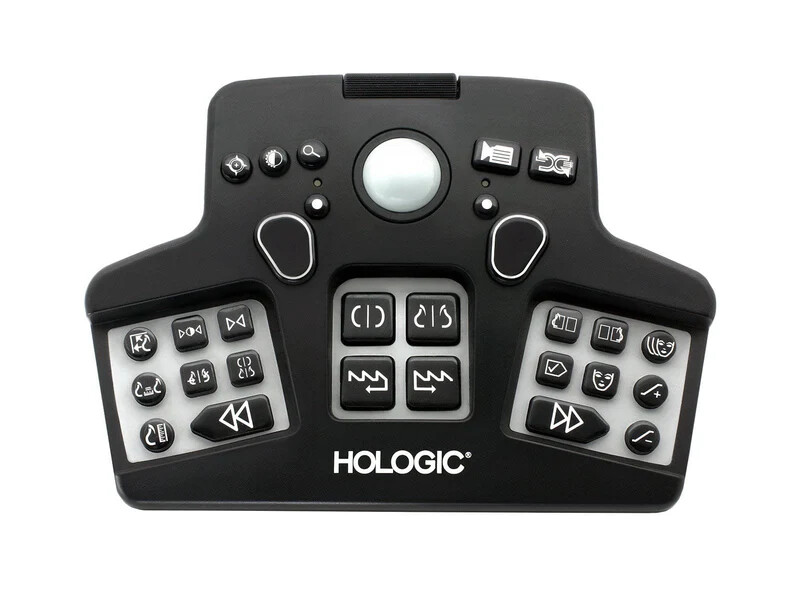
Based on my initial testing with Wireshark, it appears to actually be a composite device that contains both HID interfaces which represent a keyboard and mouse, with a USB Standard Descriptor (I think?)
When the device is directly connected into my computer, which runs Windows 10, without any additional specialized software, the mouse functionality works as expected and the large scroll bar above it works correctly. The buttons also work as expected, acting as a keyboard with some of the keys representing letters (the magnifying glass outputs an “A” letter when pressed), some representing arrow keys or home/end, and some representing Fn keys (the videocamera button on the top left being the F6 key).
However, when I connect the device into to the v5 HID remapper board, neither the mouse nor keypad functionality that previously worked continues to work. Additionally, when I look at the monitor tab, no information is being picked. However, the keypad does have a backlight which still continues to turn on when connected.
To troubleshoot, I have confirmed that the HID remapper works with other devices, such as a spare mouse and keypad that I have, appropriately transmitting the outputs and recognizing them on the monitoring tab. I have also tried different USB C to USB A wires to conenct the remapper device as well as confirmed that the keypad + remapper combination doesn’t work on any other devices that I have, so it isn’t just the computer I am working on either. I have also checked to make sure I have allowed passing inputs in the settings tab.
Additionally, I have noticed something oddly peculiar which may shed some light to someone more knowledgeable about this than I, but it seems like when I do connect the keypad to the HID remapper, it appears to “brick” itself until I unplug it and replug it in? More on that:
- If I connect a separate mouse and keyboard to the remapper and connect that to my computer, the remapper works just fine. And when I unplug the remapper and/or peripehrals, everything continues to work perfectly.
- When I initially plug in the special keypad, it lights up but the remapper doesn’t recognize or pass through any inputs as described abvoe. However, if I were to at this point connect any of the peripherals I just confirmed worked before this, they no longer work on. This occurs whether the special keypad remains connected or not. The lights no longer turn on the tested peripherals. Also, if I were to unplug and replug the special keypad at this time, it will no longer light up either.
- The remapper will continue to not pass through inputs from peripherals (or even turn on/light up for that matter) which I confirmed already work before until I unplug and replug the remapper entirely, after which all the peripherals will re-light up and work like normal.
I am not sure if any of you are aware of a similar phenomneon or know why this is happening? It definitely feels like it is related to why the remapper won’t recognize any input from the special keypad.
I would greatly appreciate any guideance or feedback on how I could more forward with this. I have exported some packets from Wireshark that I logged from the special keypad, which includes my moving the scroll bar up and down as well as hitting the equivalent of the “A”, F9, and right arrow key.
I do apologize for the long-winded explanation and once again grateful and thankful in advance for any help/guidance.