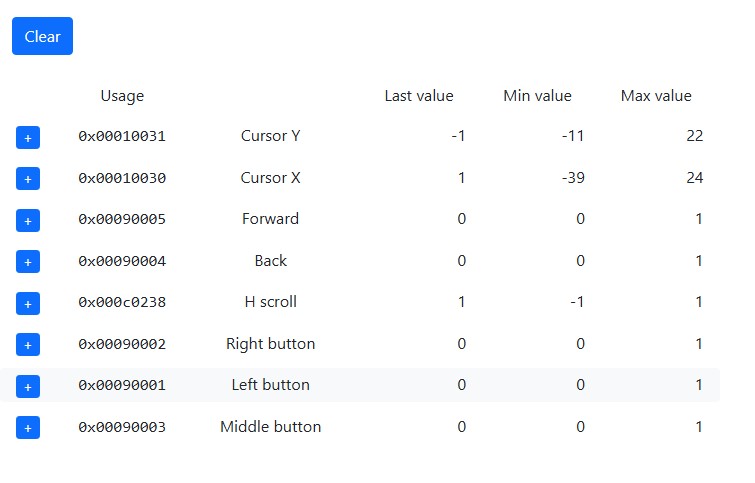
To the right of what is called the Right Button, the Elecom has an additional button.
It creates usb traffic, when clicked both Pico boards flash.
This makes this a 9 button trackball.
Please can you point me in the right direction to modify the code to be able to process this button?
The trackball likely doesn’t properly expose that button in its report descriptor. We have quirks for some Elecom devices, but I think they had 8 buttons at most so maybe yours isn’t one of them. Can you see inputs from buttons 6-8?
Anyway, you can get to the data using custom usages. You would have to identify the bit in the input report that the button is encoded on, then create something like this:
You can use Wireshark to see the data the trackball sends, as shown here:
More info on custom usages:
https://www.remapper.org/manual/#custom-usages
This video is about the DualSense controller, but it’s the same principle:
I saw your Wireshark video while you were posting! As shown in the screenshot, the first 8 buttons are all monitorable and therefore assignable.
Here’s the capture which includes the 9th button (don’t ask me which entry, I have no idea!)
Cheers.
Can’t upload it here how do I get it to you? Github?
OK, as far as I can tell this is a 6-button trackball, unless you count the horizontal scroll tilt (and something else as that would only get you to 8?).
Based on the information in the Linux kernel it’s identical to some other trackballs we already have special handling for (adding the sixth button). I can probably add the IDs for this one in the future.
You should be able to access the sixth button with a custom usage like this:
I was counting the horizontal scroll. But I still counted wrong! 
Implemented your Custom usagee.
Works a treat!
Thanks very much.
2 Likes