I’ve noticed with the Sony Playstation Classic Controller, the Cursor Y and Cursor X always input a Last value of 1. It’s a D-pad controller and not a left stick.
Because of that the controller always input moves when bind to keyboard arrows over and over in a loop (making impossible to use it).
Here how it works :
Cursor Y = 0 = Up Arrow
Cursor Y = 2 = Down Arrow
Cursor X = 0 = Left Arrow
Cursor X = 2 = Right Arrow
Cursor Y = 1 = Default Position = Should be Nothing
Cursor X = 1 = Default Position = Should be Nothing
How i can bind correctly my controller ?
I’ve tried expressions but it’s hard to know what to write.
Yes i’m using the HID Remapper with buildin HUB from Mavercade.
My controller is plugged on port 1.
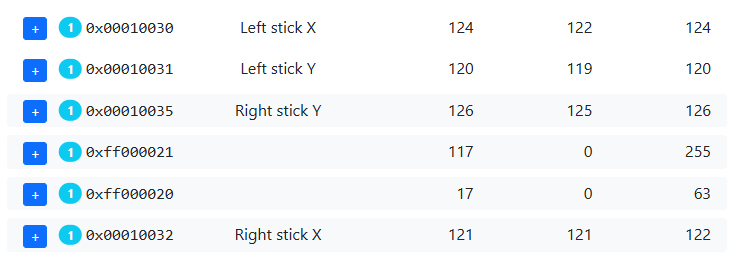
Also in “Monitor” i can see as long my controller is plugged it input value of 1 on both Cursor Y/X in looping all the time.
What we need is ignore that 1 value (who is the default position) and only read values 0 and 2.
Thank you. I don’t see anything weird in there that would explain the phantom inputs (weirder than what we already knew anyway). When you’re experiencing the phantom inputs, do you also see them in the Monitor tab? Does Cursor X/Y go to 0 or 2 without you touching the controller?
Also, were you experiencing them even before you configured the mappings I suggested?
No Cursor X/Y never go to 0 or 2 without touching the controller.
It’s always value 1 who is send over and over every milliseconds.
I get that issue only with that controller.
Yes when i did normal mappings i had that issue too before, it’s like the HID Remapper using that value 1 to move.
On another controller like the PS4 Controller i see stuff sending over and over but they are not used in my mappings.
Also how i can map the left stick of the PS4 controller for arrows of the keyboard ?
And i can change the LED color of the PS4 controller ? Or just turn it off.
With the configuration you posted it shouldn’t be using the “1” value for anything.
There’s an example configuration that shows how to map an analog stick to arrow keys in the Examples tab (“analog stick cardinal directions to D-pad”).
I’ve tried without the 1 but same issue, it moving by itself still.
Ok thanks i will try that mapping for the PS4 controller.
However i prefer using the Playstation Classic Controller as it have exactly the number of buttons i need to mimick a classic USB GamePad to keyboard.
I’ve tried that “analog stick cardinal directions to D-pad” it does now the same problem with my PS4 Controller as with my Playstation Classic Controller, i get random automatic movements to left/right up/down in loop.
The sticks left/right of the Dualshock 4 (and same for Xbox 360) once i add the code, they move left/right up/down without touching the controller and in loop sadly.
Do you know how i can force the HID Remapper to ignore the values/noises to not make it auto move left/right up/down for my 3 controllers ? (PS4, PS1 and Xbox 360)