I am looking for a specific function

Hello Team,
I am using an external keypad to control a CNC machine via the “iosender” app.
After a key combination is entered, Iosender requires a “KeyUp: true” event to execute it.

As example: For “Homing” I need Strg+H as command. I use on the keypad the button “PageDown” and I send the key combination via a macro. The values ​​can also be seen in the IOsender console. However, the app requires a KeyUp at the end.

Here is an example from the link below. Example Strg+R for sycle start:

System R Alt False
LeftAlt None None False
System R None True

Here is the information from Terjeio.

How could I implement that using the HID Remapper?

Many thanks and best regards,
Helmut
There’s no such thing as “key up” or “key down” events in the protocol keyboards use. Keyboards just send a list of currently pressed keys every time the user presses or releases a key. The software on the host can of course compare the list of keys that were pressed in the previous report to the list of keys that are pressed in the current report and generate “key down”/“key up” events for keys that weren’t pressed previously and are pressed now or vice versa.

What is it that you really need the keyboard to do? Send some sequence of keystrokes (a macro)? Triggered by what?

Many thanks for the quick reply!

I would like to control the CNC machine using my keypad (32 keys). HID Remapper is perfect for assigning the keyboard shortcuts.

Some keys, such as “Right Arrow,” “Left Arrow,” etc., work perfectly. Others, however, do not.

When I press the “Page Up” key on the keypad, “Ctrl+H” should be sent to IOsender. It does send it—you can see it in the IOsender console—but IOsender does not execute the command.

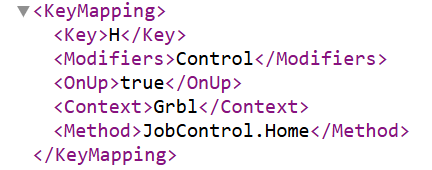
Here is the IOsender keymap for homing, from an XML file.

When I use the key combination “Ctrl+H” on the PC, the following is displayed in the console and homing works.

LeftCtrl None Control False
H None Control False
$H ← Just noticed—there’s a $ command here.
H None Control True
<Home|MPos:-11.603,-11.600,-11.600,0.000|Bf:100,1023|FS:0,0|Pn:HS>
LeftCtrl None None False
LeftCtrl None Control False
C None Control False
LeftCtrl None None False
C None None False
<Home|MPos:-1.603,-1.600,-1.600,0.000|Bf:100,1023|FS:0,0|Pn:HS>
[MSG:]
ok

When I use the external keypad, it shows up on the console. The machine does not perform a homing sequence.

LeftCtrl None Control False
H None Control False
LeftCtrl None None False
H None None False

On the keypad, I use the “Page Up” key and a macro with the key combination.

Many thanks,
Helmut

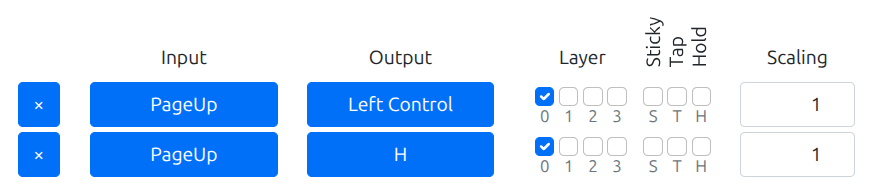
How are you currently implementing the PageUp → Ctrl+H mapping? With something like this?

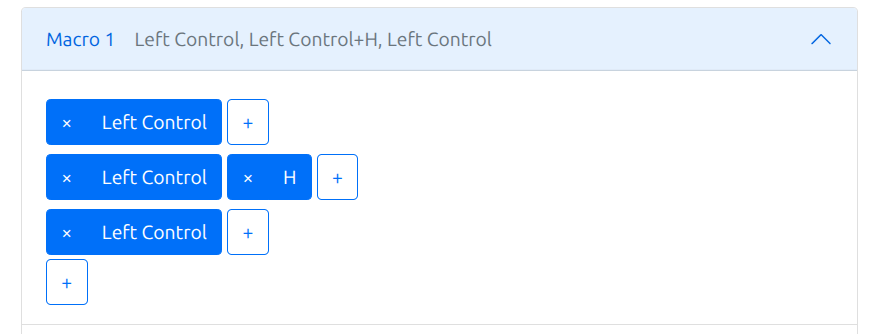
You can try making a macro like this:

And mapping PageUp to the macro.

This will make it so that Control is pressed and held first, then H is pressed and released, then Control is released.

Perhaps this makes a difference to the software you’re using.

Thank you very much, this scenario works great!

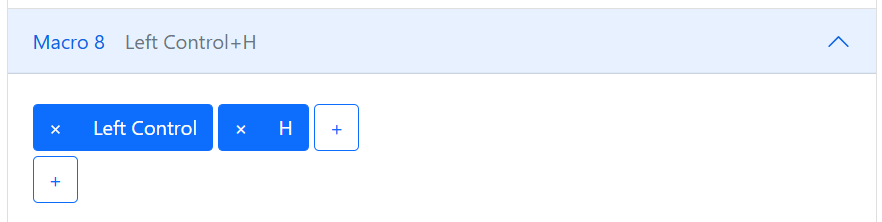
I had set it up that way, but that didn’t work.

I hope I can now correctly define the remaining 8 commands as well. :grinning_face:

Thanks again for the help!

Sorry, I have to write to you again.
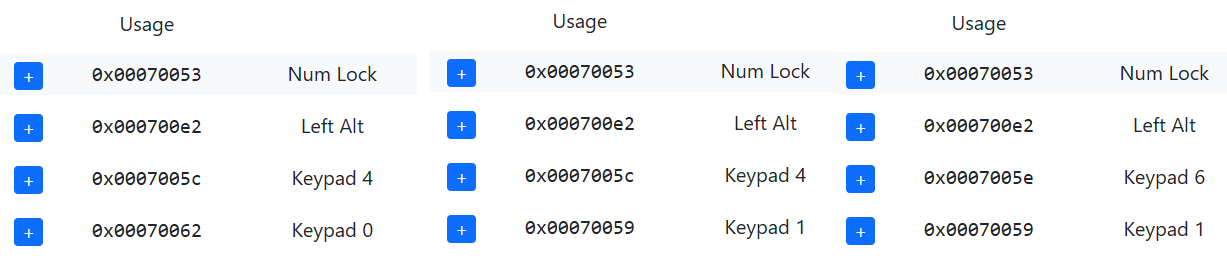
Three keys on my external keypad are outputting multiple values. This is causing unintended command overlaps. I have been experimenting for several hours now but cannot find a solution to the problem.

The three keys output the following values:

Do you have any ideas about this? If not, that’s no problem either; I’ll just leave the keys out or try a different keypad.
Many thanks, and have a great weekend!