I’ll just drop this here on the odd chance it might help someone else: here’s how I’m using HID Remapper with an MC Saite TB01 trackball where the scrolling wheel is stupidly placed below the ball. Perfect for those who evolved to grow a 6th finger from the bottom of the palm, not so much for the rest of us.
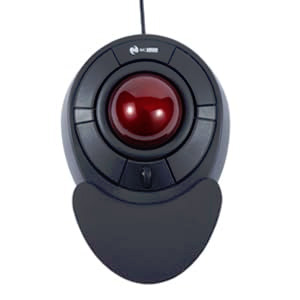
Fortunately, the awful design becomes decently comfortable to use as soon as the trackball is rotated 90° in either direction. However, in the aftermath of this brave manouver, button assignments and scrolling direction cease to make any sense.
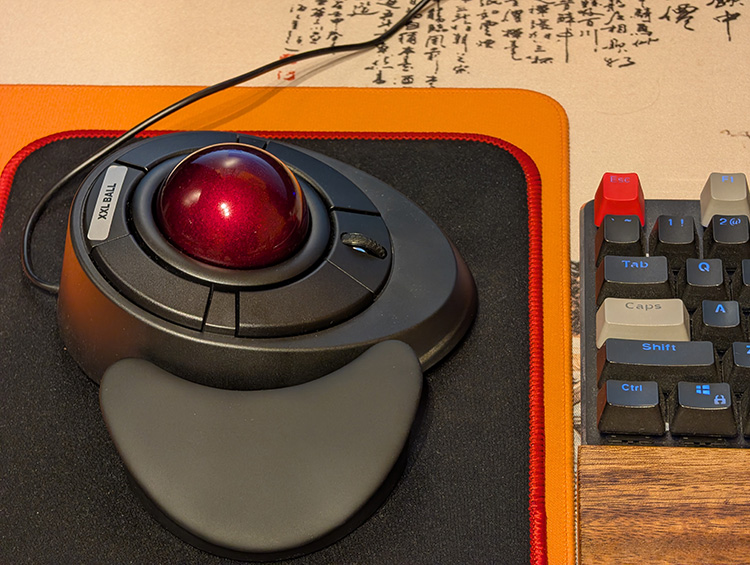
Not to worry, HID Remapper to the rescue. Big up to the author of this great tool!
New assignments
With the attached configuration, the functions are reassigned as follows:
- Scroll wheel is used for vertical scrolling just the same (no change) but can now be operated conveniently with the thumb.
- Scroll wheel button toggles between left- and right-hand operation:
- Right-hand mode (clockwise rotation) is on layer 1 (and 0).
- Left-hand mode (counter-clockwise rotation) is on layer 2.
- Holding the button and rolling the ball adjusts audio volume up and down (layer 3).
- Cursor movement is swapped X/Y and inverted depending on the active hand (layer).
- Top inner button is the left button
- Top outer button is the right button
- Bottom outer button is the middle button (convenient to press with the outer side of the hand)
- Bottom inner button (relatively the least convenient to use) is used for task switching:
- Tap to switch to previous task, i.e. Alt-Tab
- Hold longer and release to show all tasks, i.e. Win-Tab
The nitty-gritty
Arguably, the most reusable and/or interesting parts of this setup are the expressions:
- Expressions 1 and 2 are used as inputs for Cursor X/Y to discard cursor movement in volume-adjustment mode (layer 3):
1000 port 0x00010030 input_state layer_state 0x08 bitwise_and not mul
1000 port 0x00010031 input_state layer_state 0x08 bitwise_and not mul
- Another expression (saved as the last one, number 8, since it is never going to be referenced directly anyway) handles the ball movement, storing it in registers 1-4 for volume-control purposes while also swapping where it is being stored in one of the directions (effectively reversing it) depending on whether layer 2 (left-hand mode) is concurrently active or not:
1000 port 0x00010030 input_state -1 lt 2 layer_state 0x04 bitwise_and not sub store
1000 port 0x00010030 input_state 1 gt 1 layer_state 0x04 bitwise_and not add store
1000 port 0x00010031 input_state -1 lt 3 store
1000 port 0x00010031 input_state 1 gt 4 store
Customization
The configuration assumes the trackball being connected to port 1, while a mouse connected to port 2 can be used as well – without any remapping taking place. If you do not plan to use multiple devices:
- Delete all occurrences of
1000 portfrom the expressions - Remove all mappings for source port
2and - Change source port from
1to0elsewhere
Since I simply edited the JSON file directly so as to always start with the same consistent state, it should hopefully be somewhat more legible than if it were auto-generated.
Tested to work with release 2026-05-25 (configuration version 18). Enjoy!
The JSON Configuration File*
{

  "version": 18,
  "unmapped_passthrough_layers": [0, 1, 2, 3, 4, 5, 6, 7],
  "partial_scroll_timeout": 1000000,
  "tap_hold_threshold": 200000,
  "gpio_debounce_time_ms": 5,
  "macro_entry_duration": 1,
  "interval_override": 1,
  "our_descriptor_number": 0,
  "input_labels": 0,
  "gpio_output_mode": 0,
  "ignore_auth_dev_inputs": false,
  "normalize_gamepad_inputs": true,

  "quirks": [],

  "macros": [
    [["0x000c00e9"],[]],
    [["0x000c00ea"],[]],
    [], [], [], [], [], [], [], [], [], [], [], [], [], [], [], [], [], [], [], [], [], [], [], [], [], [], [], [], [], []
  ],

  "expressions": [
    "1000 port 0x00010030 input_state layer_state 0x08 bitwise_and not mul",
    "1000 port 0x00010031 input_state layer_state 0x08 bitwise_and not mul",
    "",
    "",
    "",
    "",
    "",
    "1000 port 0x00010030 input_state -1000 lt 2000 layer_state 0x04 bitwise_and not sub store eol 1000 port 0x00010030 input_state 1000 gt 1000 layer_state 0x04 bitwise_and not add store eol 1000 port 0x00010031 input_state -1000 lt 3000 store eol 1000 port 0x00010031 input_state 1000 gt 4000 store"
  ],

  "mappings": [
    {"source_port": 1, "source_usage": "0xfff30001", "target_port": 0, "target_usage": "0x00010031", "layers": [0, 1], "sticky": false, "tap": false, "hold": false, "scaling": 1000},
    {"source_port": 1, "source_usage": "0xfff30002", "target_port": 0, "target_usage": "0x00010030", "layers": [0, 1], "sticky": false, "tap": false, "hold": false, "scaling": -1000},
    {"source_port": 1, "source_usage": "0x00090001", "target_port": 0, "target_usage": "0x00090001", "layers": [0, 1], "sticky": false, "tap": false, "hold": false, "scaling": 1000},
    {"source_port": 1, "source_usage": "0x00090002", "target_port": 0, "target_usage": "0x000700e2", "layers": [0, 1], "sticky": false, "tap": true, "hold": false, "scaling": 1000},
    {"source_port": 1, "source_usage": "0x00090002", "target_port": 0, "target_usage": "0x0007002b", "layers": [0, 1], "sticky": false, "tap": true, "hold": false, "scaling": 1000},
    {"source_port": 1, "source_usage": "0x00090002", "target_port": 0, "target_usage": "0x000700e3", "layers": [0, 1], "sticky": false, "tap": false, "hold": true, "scaling": 1000},
    {"source_port": 1, "source_usage": "0x00090002", "target_port": 0, "target_usage": "0x0007002b", "layers": [0, 1], "sticky": false, "tap": false, "hold": true, "scaling": 1000},
    {"source_port": 1, "source_usage": "0x00090003", "target_port": 0, "target_usage": "0xfff10002", "layers": [0, 1], "sticky": true, "tap": true, "hold": false, "scaling": 1000},
    {"source_port": 1, "source_usage": "0x00090004", "target_port": 0, "target_usage": "0x00090002", "layers": [0, 1], "sticky": false, "tap": false, "hold": false, "scaling": 1000},
    {"source_port": 1, "source_usage": "0x00090005", "target_port": 0, "target_usage": "0x00090003", "layers": [0, 1], "sticky": false, "tap": false, "hold": false, "scaling": 1000},
    {"source_port": 1, "source_usage": "0x00010038", "target_port": 0, "target_usage": "0x00010038", "layers": [0, 1], "sticky": false, "tap": false, "hold": false, "scaling": 1000},

    {"source_port": 1, "source_usage": "0xfff30001", "target_port": 0, "target_usage": "0x00010031", "layers": [2], "sticky": false, "tap": false, "hold": false, "scaling": -1000},
    {"source_port": 1, "source_usage": "0xfff30002", "target_port": 0, "target_usage": "0x00010030", "layers": [2], "sticky": false, "tap": false, "hold": false, "scaling": 1000},
    {"source_port": 1, "source_usage": "0x00090001", "target_port": 0, "target_usage": "0x000700e2", "layers": [2], "sticky": false, "tap": true, "hold": false, "scaling": 1000},
    {"source_port": 1, "source_usage": "0x00090001", "target_port": 0, "target_usage": "0x0007002b", "layers": [2], "sticky": false, "tap": true, "hold": false, "scaling": 1000},
    {"source_port": 1, "source_usage": "0x00090001", "target_port": 0, "target_usage": "0x000700e3", "layers": [2], "sticky": false, "tap": false, "hold": true, "scaling": 1000},
    {"source_port": 1, "source_usage": "0x00090001", "target_port": 0, "target_usage": "0x0007002b", "layers": [2], "sticky": false, "tap": false, "hold": true, "scaling": 1000},
    {"source_port": 1, "source_usage": "0x00090002", "target_port": 0, "target_usage": "0x00090001", "layers": [2], "sticky": false, "tap": false, "hold": false, "scaling": 1000},
    {"source_port": 1, "source_usage": "0x00090003", "target_port": 0, "target_usage": "0xfff10001", "layers": [2], "sticky": true, "tap": true, "hold": false, "scaling": 1000},
    {"source_port": 1, "source_usage": "0x00090004", "target_port": 0, "target_usage": "0x00090003", "layers": [2], "sticky": false, "tap": false, "hold": false, "scaling": 1000},
    {"source_port": 1, "source_usage": "0x00090005", "target_port": 0, "target_usage": "0x00090002", "layers": [2], "sticky": false, "tap": false, "hold": false, "scaling": 1000},
    {"source_port": 1, "source_usage": "0x00010038", "target_port": 0, "target_usage": "0x00010038", "layers": [2], "sticky": false, "tap": false, "hold": false, "scaling": 1000},

    {"source_port": 1, "source_usage": "0x00090003", "target_port": 0, "target_usage": "0xfff10003", "layers": [0, 1, 2, 3], "sticky": false, "tap": false, "hold": true, "scaling": 1000},
    {"source_port": 1, "source_usage": "0xfff50001", "target_port": 0, "target_usage": "0xfff20001", "layers": [3], "sticky": false, "tap": false, "hold": false, "scaling": 1000},
    {"source_port": 1, "source_usage": "0xfff50002", "target_port": 0, "target_usage": "0xfff20002", "layers": [3], "sticky": false, "tap": false, "hold": false, "scaling": 1000},
    {"source_port": 1, "source_usage": "0xfff50003", "target_port": 0, "target_usage": "0xfff20001", "layers": [3], "sticky": false, "tap": false, "hold": false, "scaling": 1000},
    {"source_port": 1, "source_usage": "0xfff50004", "target_port": 0, "target_usage": "0xfff20002", "layers": [3], "sticky": false, "tap": false, "hold": false, "scaling": 1000},
    {"source_port": 1, "source_usage": "0x00010030", "target_port": 0, "target_usage": "0x00000000", "layers": [3], "sticky": false, "tap": false, "hold": false, "scaling": 1000},
    {"source_port": 1, "source_usage": "0x00010031", "target_port": 0, "target_usage": "0x00000000", "layers": [3], "sticky": false, "tap": false, "hold": false, "scaling": 1000},

    {"source_port": 2, "source_usage": "0x00010030", "target_port": 0, "target_usage": "0x00010030", "layers": [0, 1, 2, 3], "sticky": false, "tap": false, "hold": false, "scaling": 1000},
    {"source_port": 2, "source_usage": "0x00010031", "target_port": 0, "target_usage": "0x00010031", "layers": [0, 1, 2, 3], "sticky": false, "tap": false, "hold": false, "scaling": 1000},
    {"source_port": 2, "source_usage": "0x00090001", "target_port": 0, "target_usage": "0x00090001", "layers": [0, 1, 2, 3], "sticky": false, "tap": false, "hold": false, "scaling": 1000},
    {"source_port": 2, "source_usage": "0x00090002", "target_port": 0, "target_usage": "0x00090002", "layers": [0, 1, 2, 3], "sticky": false, "tap": false, "hold": false, "scaling": 1000},
    {"source_port": 2, "source_usage": "0x00090003", "target_port": 0, "target_usage": "0x00090003", "layers": [0, 1, 2, 3], "sticky": false, "tap": false, "hold": false, "scaling": 1000},
    {"source_port": 2, "source_usage": "0x00090004", "target_port": 0, "target_usage": "0x00090004", "layers": [0, 1, 2, 3], "sticky": false, "tap": false, "hold": false, "scaling": 1000},
    {"source_port": 2, "source_usage": "0x00090005", "target_port": 0, "target_usage": "0x00090005", "layers": [0, 1, 2, 3], "sticky": false, "tap": false, "hold": false, "scaling": 1000},
    {"source_port": 2, "source_usage": "0x00010038", "target_port": 0, "target_usage": "0x00010038", "layers": [0, 1, 2, 3], "sticky": false, "tap": false, "hold": false, "scaling": 1000}

  ]

}
*) Newly-created user account, so can’t upload it as an attachment.
Edit: Port number value correction following @jfedor’s suggestion below in this thread.
