For some reason my keyboard wont connect at all through this device ive trued all sorts of different methods of connecting it and im just lost on what to do now? Could i pleqse get some help
There are many reasons why it might not work.
The Waveshare RP2040-PiZero board has some unnecessary resistors on the USB data lines, which in my testing caused it to sometimes only work when the devices are plugged in in certain order (keyboard into the PiZero, then the PiZero into your PC, or the other way round).
Maybe it will work with another board like the Feather with USB Host.
Maybe it will work with a dual Pico setup.
Maybe there’s something wrong with the keyboard’s report descriptor. You can try dumping it and some traffic as shown here:
If you mentioned what keyboard it is maybe someone could confirm that it worked or didn’t work for them.
Another thing you can try is, after plugging everything in, press and release the RUN button on the RP2040-PiZero board and see if that makes it recognize your keyboard.
Hello, I saw this thread and it was somewhat related to my question. Will this board set up be compatible with your HID remapping firmware? I bought a device set up like this running ogx-mini firmware, but I fear it will not recognize my Rapinc Winserford Mouser Gamepad ( Amazon.com: Mouserpad for FPS games Left hand gaming keyboard Gamepad with Mouse : Video Games) as it shows up as a keyboard HID in windows, not generic HID which ogx-mini supports.
I won’t find out until tomorrow, but I just wanted to ask ahead of time. I’m very new to the microcontroller world, so please forgive me of my ignorance as I try to learn. I’m trying to achieve true analog movement with the stick as it can only be bound to wasd out of the box. Thank you so much for your help.
This is how the board layout is to work with the ogx-mini firmware.
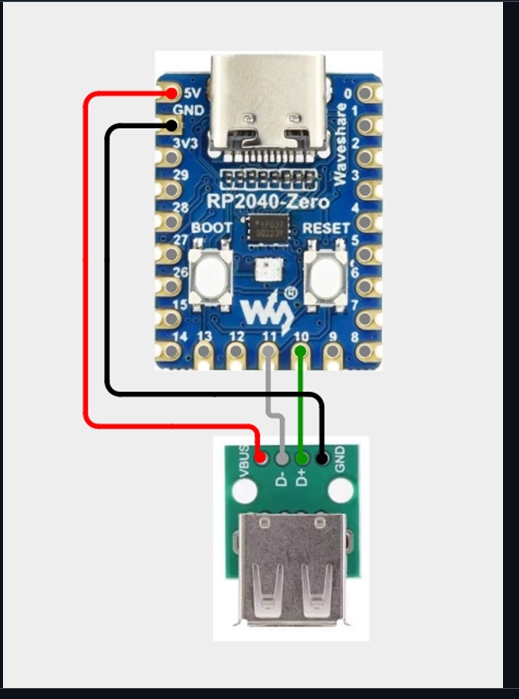
the thing is like, the board doesnt show up entirely when i try connectinf it to hid remapper i just get “no hid devices found” and it doesnt work,
@Ramboss As you can see it uses different pins for the USB port. These aren’t runtime configurable in HID Remapper so you’d have to compile your own build or resolder the wires.
@Ramtin2025 It won’t show up as a separate device on your computer, the only device you’ll see even if it works is HID Remapper itself.
What i mean is when im on hid remapper and i click open device, it doesnt show ip there in the first place how do i problem solve this?
Did you flash the firmware?
How do i flash the firmware if im unable to connect it in the first place? Is it the option on the hid remapper site?
The configuration website can only connect to the board once it’s running HID Remapper firmware.
To flash the firmware you press and hold the BOOT button, then press and release the RUN button. A USB drive named RPI-RP2 will show up on your computer. Copy the right UF2 file to that drive.
Thank you this helped me set it up but now i have the issue that the remapping i set up just doesnt seem to work? What could this be related to
You will have to be more specific.
Hello so i did a bit more messing around and the inputs on my keyboard work but, when i try to remap it to a PlayStation controller it doesnt seem to read any of the inputs which i put into it, is there a new format for PlayStation controller remapping on keybord?
If you change the emulated device type, you have to unplug and replug HID Remapper for it to work.
Can you export your configuration as a JSON file and post it here?
hid-remapper-config.json (10.1 KB)
im confused on what you mean? like unplug and replug into my PC or my console?
Just that if you change the emulated device type (from mouse & keyboard which is the default to PS4 for example) and save the config, it won’t work immediately. If you’ve since unplugged your HID Remapper at all then you don’t have to worry about it.
The configuration looks fine. When you plug it into a PC and go to a gamepad testing website like https://joypad.ai/ does it not work (messed up button mapping is normal, but it should at least do something)? On the configuration website when you go to the Monitor tab and press keys on the keyboard, do they show up there?
Yep it works on the tester site but now how do i get the inputs to work on my PlayStation then?
It should just work (with the known limitations that I hope you’re aware of, fighting games only and 8 minute timeout without an additional authentication device).
Are you pressing the home/PlayStation button (whatever key on the keyboard is mapped to it) after connecting this setup to your PS5?
Thank you, what wires would I have to resolder into to make this work? Thanks so much for your help.