Hello! Thank you for this wonderful project! Still can’t believe setup consisted of transferring a UF2 file…
I want to pair the nRF52840 with an Android phone, but nothing happens. I tried using Chrome on a Chromebook, but was unable to find/see the nRF52840 BLE from any other device. Pairing a mouse worked automatically, without any interactions.
Is this pairing possible? I want to use HID Remapper to connect two Android phones, with one acting as a keyboard for the other – a dual screen setup to allow a larger keyboard for faster typing. (The LG G8x and V60 had dual screen cases which facilitated this.)
There are Android keyboard apps (FDroid & Play) which can control other BLE devices (TVs, PCs, etc). These apps relay inputs from the phone’s onscreen keyboard to the remote device, effectively turning a phone into a wireless keyboard (or other controller device).
I was hoping HID Remapper + the Seeed nRF52840 would make this easy. Am I doing something wrong?
I’m beginning to suspect Android phones can only act as BLE central/master and never as peripheral/slave. Is there a way to force an Android phone to switch roles? I had assumed the keyboard app would take care of that, but perhaps switching roles requires root permission? (I was originally hoping to avoid root by using HID Remapper.)
You will never see HID Remapper when scanning for devices. You have to make whatever app you’re using advertise and then HID Remapper will see it and try to connect to it. An Android device can act as a Bluetooth LE peripheral. But make sure it’s even using Bluetooth LE, not Classic.
Why not connect your two phones directly over Bluetooth?
After a brief deep dive I can answer my own question: Android can advertise in both roles, so the keyboard app I’m using must not be capable of switching roles for the phone its running on. I have other apps I can try. Just didn’t want to bang my head against 6 more apps without knowing if it’s possible.
(Note: I didn’t notice who I was replying to. You obviously know most/all of this. Thanks for your input!)
Good question! I’m not 100% certain a direct Bluetooth connection between 2 phones couldn’t be made to work, but the absence of any simple “dual screen” apps or hacks suggests its not easy or not possible. I can’t be the only person who thought this might be useful (using one phone as an input device for a second phone).
The HID route just works on the receving phone with the nRF52840. No need for a local receiver app like most screen & input sharing setups. That’s why I got excited when I stumbled on Remapper! I’ll look into it a little more, but the receiving phone needs to know what to do with the BLE packets and HID support is built in & automatic. Even if a direct pairing were possible, I would prefer a solution that doesn’t require any setup after the initial pairing.
The BIG advantage of the HID approach is that it will work with any app on the receiving phone. Remote apps will need/have no awareness of the BLE link. Its just an external keyboard to them.
Someone on Stack Overflow suggested a Nordic app which allows tinkering with host roles & everything Bluetooth for debugging. I haven’t played with it yet, but here’s the link if anyone’s interested in this issue. (Nordic designed the nRF52840.) nRF Connect for Mobile
Android works with regular Bluetooth keyboards and mice just fine, there would be no special setup as long as the keyboard app on the other phone acts emulates one, which it does if it works with computers.
Understood. I will dig a bit, but I’ve already searched high & low for ways to do this. Even in the use case of controlling a TV, android phones require an app as intermediate. You’re suggesting a direct connection between the onscreen soft keyboard and the remote device. That’s precicely what I want, but Android doesn’t seem to provide a way to route the soft keyboard output to Bluetooth directly – the onscreen keyboard is never independent of a running app. That’s what the Bluetooth keyboard apps I’m evaluating do – form a bridge to the Bluetooth stack. Bypassing HID & the nRF52840 would require the sending phone to assume a peripheral role, but there’s no user exposed Android settings to force that – the interfaces seem to require an app. Your point about registering one phone as a Bluetooth keyboard on the second phone should work in theory. I just can’t find a way to set it up. Remapper avoids all this complexity by using the external keyboard HID interface… if I can find a keyboard app that will switch the role of the sending phone so the nRF52840 can find it. Thanks for helping me think this through. If I’m missing something obvious please let me know!
…the MOST direct way to achieve what I want would be to connect the two phones over USB. Then the sending phone can pretend to be a USB keyboard. Unfortunately switching to the appropriate USB mode requires root privilege on the sending phone. I want to avoid that if possible.
To make the app work with HID Remapper you will have to do the same thing you would have to do to make it work with another phone directly. If anything, it will be harder because HID Remapper only works over Bluetooth LE, while another phone will work over both LE and Classic.
The Nordic Semi debugging & scanner app (linked above) allows capture & rebroadcast of BLE advertisement packets. Its a very complex app and will take some time to understand, but it should be able to solve my problem directly. Its supposed to be able to advertise as a peripheral. If that works, then the nRF52840 will connect. I didn’t fully understand that Bluetooth pairings are device to device, and are not app specific. Once the pairing is formed via the Nordic app, then ANY app should be able to use the pairing. A Bluetooth keyboard app should be able to use the pairing even if it cannot advertise as peripheral. I shouldn’t need to try all the BT keyboard apps I have. That’s the hope…
…In addition, the BT keyboard app I would like to use (from FDroid) can utilize the device MAC address to pair if all else fails. The Nordic app might be able show me the MAC address for the nRF52840 without me having to install the developer IDE. Using the MAC address might facilitate automatic re-pairing in the absence of peripheral advertisements from the phone (the default case). Or the re-pairing process may be more complex than my beginner’s ideas – I’m probably confusing pairing & bonding as I write this.
Hello again! What you suggested (a direct Bluetooth link between phones) works! There are a lot of setup details I don’t understand – I got it working by playing around without really knowing what I was doing. But proof of concept! Thank you for questioning my approach.
Setting up the initial BT pairing does require the intervention of the Nordic Semi debug app – one phone has to advertise as a peripheral and Android phones don’t normally do that. The Nordic app can do that, but none of the Bluetooth keyboard apps I tried were able to setup the pairing. Once paired, all apps can see the remote client device, and the receiving phone sees the peripheral phone as an input device.
However the correct pairing seems to require specific parameters I don’t yet understand. One keyboard app was able to send keystrokes, but another keyboard app refused until I “jiggled” the pairing. Different apps seem to implement the protocols differently or incompletely.
I will still pursue using my Seeed nRF52840 + HID Remapper as a fallback Bluetooth connection. I plan to use several old devices – going as far back as 2011 – linked in pseudo dual screen configurations. It seems likely the direct Bluetooth link won’t work in all configurations. There are very old devices I have avoided because of Android compatibility issues, but a working Bluetooth HID link might allow me to make use of old devices with no recent equivalent, such as high resolution 7 inch tablets.
I also want to connect phone soft keyboards to old e-ink tablets (ereaders) as displays. Old e-ink soft keyboards are almost unusable because of the slow refresh. Using a phone-as-keyboard + e-ink as secondary display would allow rapid typing in direct sunshine, which is one of my goals – a poor man’s e-ink mini notebook. There are several old ereaders which meet my needs, but none of them run stock Android, and many don’t have Bluetooth. This was the original reason to seek an external hardware solution for the pairing. I’m trying to make use of cheap old hardware off eBay, and a zero-setup HID solution still seems like the safer bet – it requires only USB keyboard support.
UPDATE: The Nordic Semi app runs on Android 4.3, which implies the direct Bluetooth link you suggested will work with many very old devices.
(The need for a dual device setup comes from needing a landscape soft keyboard to make typing easier. If the soft keyboard takes up most of the screen, there’s no room for the app. LG produced a few dual screen phones that allowed a full screen keyboard on one screen while working in an app on the other. Ergonomics makes small tablets non-ideal. The result of my hack is meant to be held in one hand while typing with the other hand. The most natural wrist positions would twist a small tablet and make reading the screen difficult. With two devices, one can be aligned with both wrists for typing, while the second display device can be positioned for best visibility. Folding phones & hinged duel screens can’t provide the good ergonomics needed for prolonged use – I have a lot of writing ahead of me and I can’t do it sitting down.)
None of that is necessary. I literally just typed “bluetooth keyboard” in the Play Store search box and installed the first app that pops up. It was this one:
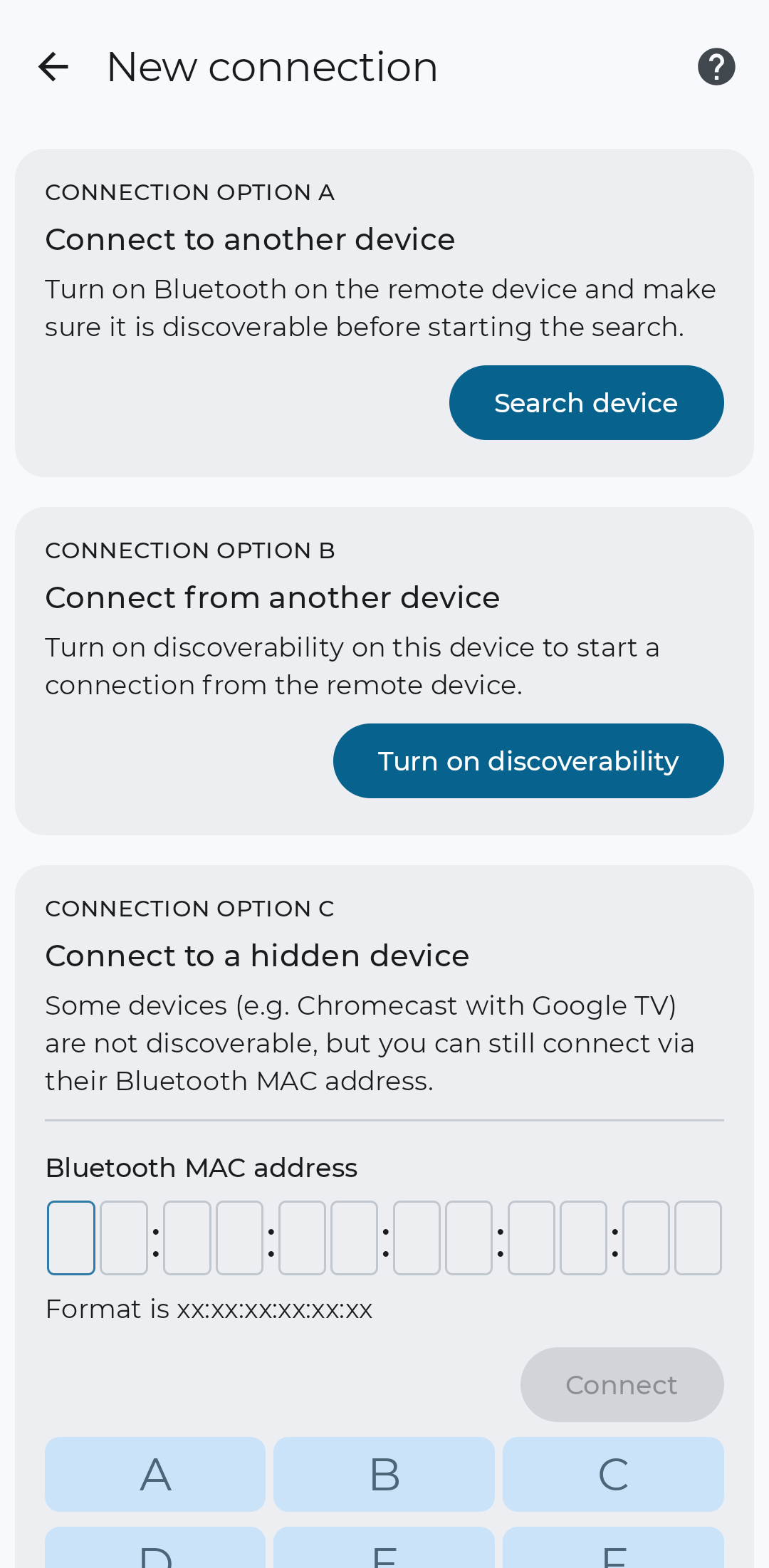
When pairing with a new device it gives you the following options:
Both option A and option B work just fine without messing with any additional apps. Just follow the instructions. If you choose option A, go into Bluetooth settings on the other device to make it discoverable (it will say something like “Visible as X to other devices”), then select it on the device with the keyboard app on it and confirm the pairing on both devices. If you choose option B, go into Bluetooth settings on the other device, tap “Pair new device”, select the device that has the keyboard app on it, confirm the pairing and that’s it. Option B looks exactly the same as when you connect an actual physical Bluetooth keyboard to your phone.
That’s one of the apps I’ve been trying to get working! There are others, but this one is clean & well designed, and can be configured as keyboard only (no mouse/trackpad wasting valuable screen space).
My primary phone, used for testing, does not have any option to make it visible (Samsung S10, Android 12). I just checked again. The current secondary (LG V20, Android 7.0) doesn’t have this option in settings, but I just noticed some tiny print which says it’s visible while the Bluetooth settings page is onscreen – a no-option option! I really appreciate your reply, but the main issue is I’m using older hardware, and these BT options are either not obvious (V20) or unavailable (S10). With even older hardware I expect the exposed settings to be even less helpful.
Both the Nordic Semi app and Remapper on a Seeed nRF52840 (used as a pass-through) provide viable options when vendor settings don’t expose the “visible” setting, or BT doesn’t work as expected. This is important because it broadens the list of devices I might be able to use – my hardware options depend on my soft keyboard connection options. I’m still exploring available hardware, but most of it is more than 5yrs old, and some over 10yrs. Its good to have options!
The nRF52840 + Remapper is definitely overkill for my application, but it has the simplest setup! I didn’t want to install IDEs or follow complex procedures with other developer boards. That’s one rabbit hole too many for this project. And installing LineageOS on old unsupported devices or rooting them to gain full control is much too difficult to rely on for this project. I’m looking for low hanging fruit. A $10 Seeed qualifies!
I wouldn’t have figured all this out without your feedback. My initial test hardware (Samsung & LG) run heavily modified versions of Android – a bad choice in retrospect. I’m curious what devices you used when testing the keyboard app?