I have been using HID Remapper for macropads and it beyond EPIC.
But I am struggling with trackballs and any ideas are welcome, since it has been 2 days without any success
I can remap on a layer “Cursor X”, “Cursor Y” and “Twist to scroll”, but since this is a trackball - whenever I touch the ball it registers CursorX/Y movement and triggers all remaps at the same time.
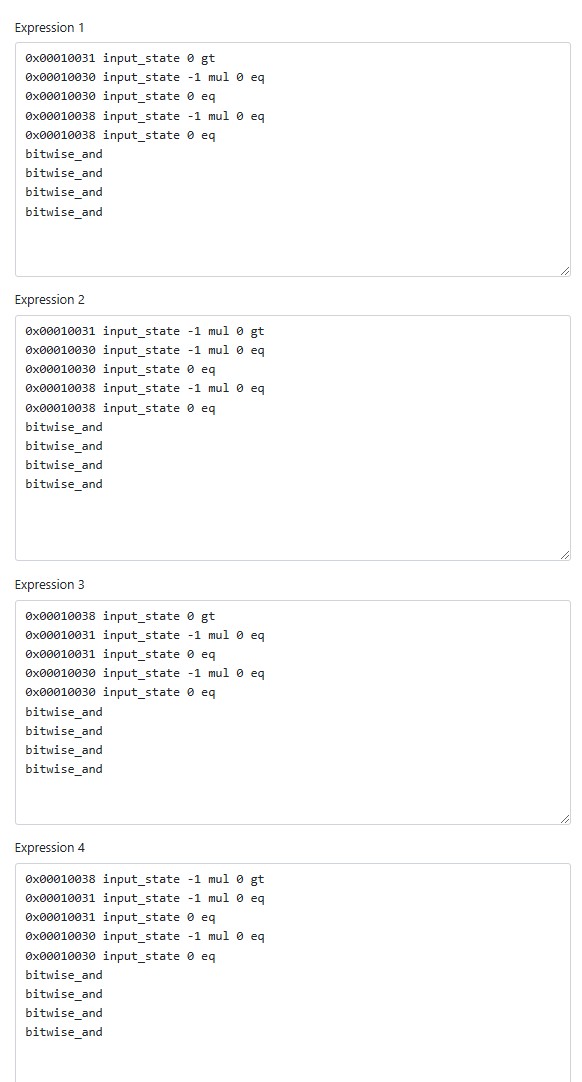
Tried adding mapping like “Cursor X → Cursor Y → 0” in attempt to block one axis when the other is being used… no luck. Tried expressions with the idea of threshold/deadzone… uhm not successful at all, to be honest, for me it is hard to wrap my head around expressions and even tried the expression builder.
——————————
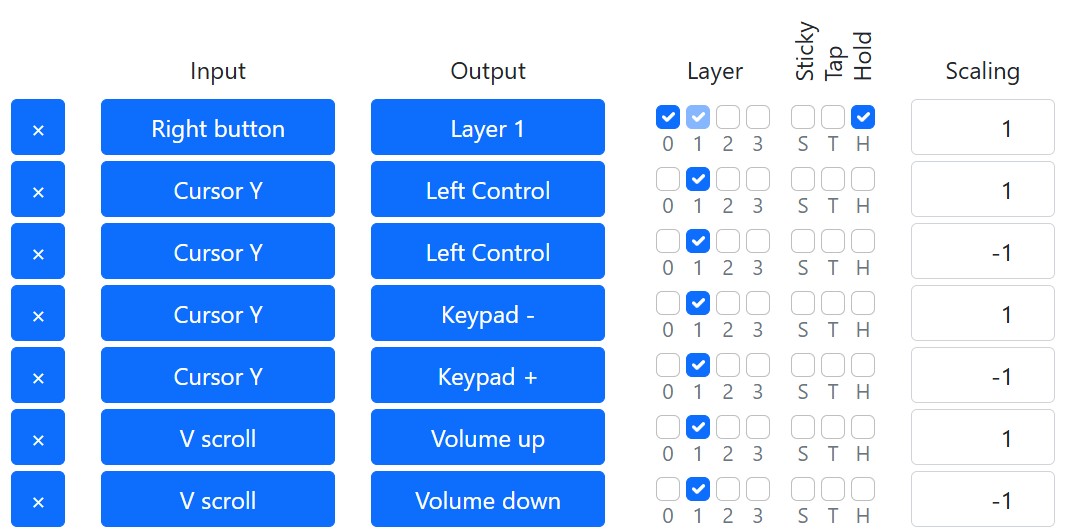
Here is a quick simple example:
I hold Right Mouse Button and Twist to scroll to adjust volume, it works, but this also triggers Zoom, as it registers CURSOR Y movement.
What trackball is this? The Kensington Slimblade? We can try some things, but ideally the decision between scrolling and cursor movement would be handled by the trackball’s firmware.
I think you need to look at this differently. I’m guessing the issue isn’t that the SBP sends both cursor and scroll movements at the same time, but that it sends a cursor movement and then engages scrolling (since it has to guess what you want it to do). I don’t have a SBP any more, so I can’t test this behaviour myself.
You could perhaps overcome this by adding a delay after the first cursor movement, then checking if the next movement is cursor or scroll and acting on that. However, you’d perceive the delay every time and that might be annoying.
There is already the standard delay from TAP/HOLD that usually drives me crazy, but this time it manages to clean the start of the action.
The problem is that during the action itself it manages to trigger the other ones, so I was holping for a deadozne around the cursor and when I go out of the zone it triggers cursor remap.
Let’s clarify something before going further, since I don’t have a SlimBlade Pro to test. Which of the following do you get when you scroll in one direction continuously?
A single, quick zoom followed by volume change
Constant zooming and volume change at the same time
The reason I ask is that we have to isolate what the SBP is sending every time you twist. I would be surprised if it sends both scroll and cursor data at the same time, because then your mouse would move all over the screen while you’re scrolling. I don’t remember that being the case, but it’s been a year since I last used one.
I hold Right mouse button and twist to scroll to change volume (since Windows uses steps of 2, sometimes it is a bit of scrolling :))
While doing all that scrolling from time to time it triggered also the zoom, it is not on every step and it is not on a set step either, it feels on random.
(the direction of the scroll and zoom in consistent with the configuration, e.g. it is not zooming in and out)
“to isolate what the SBP is sending every time you twist” - when twisting with the fingers, there is a slight cursor movement. I can see the Hid-Remmaper monitor register it, though my eyes cannot detect it.
Thanks, that detail helps a lot to understand what the SBP is doing. I wonder if the randomness comes from it detecting the faintest of pauses in your twist and sending more pointer events.
Can you try giving it a single big spin, like you’re spinning a top? I’m curious if you’ll still get the random events.
I was testing today and I believe the randomness is coming from the finger movement - at the moment when you lift and again touch the ball.
Yeah, that’s what I was getting at in my earlier comments.
Honestly, I would just program the zoom function onto Layer 2 with a different activation button/combo. Then you could also use scrolling to control zoom (if you want), and you never have to worry about accidentally triggering zoom or volume control. I know it’s less satisfying, but it’s easy to set up in a reliable way.